
Download BullZip PDF Printer – PDF creator, virtual printer, document conversion, free PDF tool, PDF generator, print to PDF, document management
Overview
BullZip PDF Printer — специализированный инструмент повышения продуктивности, разработанный для упрощения создания PDF‑файлов из широкого спектра цифровых источников, включая текстовые документы, изображения и другой печатный контент. Работая как виртуальный принтер, приложение позволяет пользователям генерировать PDF высокого качества напрямую из любой программы, поддерживающей печать, что делает его бесшовным дополнением к ежедневным рабочим процессам. Его основная цель — устранить необходимость в стороннем программном обеспечении для конвертации PDF, предлагая лёгкую и надёжную альтернативу, которая без труда интегрируется в существующие системы.
Приложение особенно полезно для профессионалов, студентов и офисных работников, которым часто требуется делиться документами или архивировать их в универсальном формате. Оно решает типичные проблемы, такие как несоответствие форматирования, отсутствие защиты и сложность инструментов конвертации файлов. С акцентом на простоту и эффективность BullZip PDF Printer улучшает управление документами, позволяя быстро, безопасно и настраиваемо получать результат.
Разработанный компанией BullZip, приложение зарекомендовало себя как бесплатное решение для создания PDF без лишних функций. Хотя конкретные детали о компании не указаны, регулярные выпуски и стабильная работа свидетельствуют о преданном коллективе разработчиков, ориентированном на полезность и надёжность. Приложение играет значимую роль в экосистеме продуктивности, предлагая безопасный, экономичный способ конвертации документов без необходимости глубоких технических знаний.
Key Features & Functionality
- Virtual PDF Printer Integration: Acts as a system-level virtual printer, allowing users to "print" any document to PDF with a single command. This functionality is especially useful when working with legacy software or applications that do not natively support PDF export.
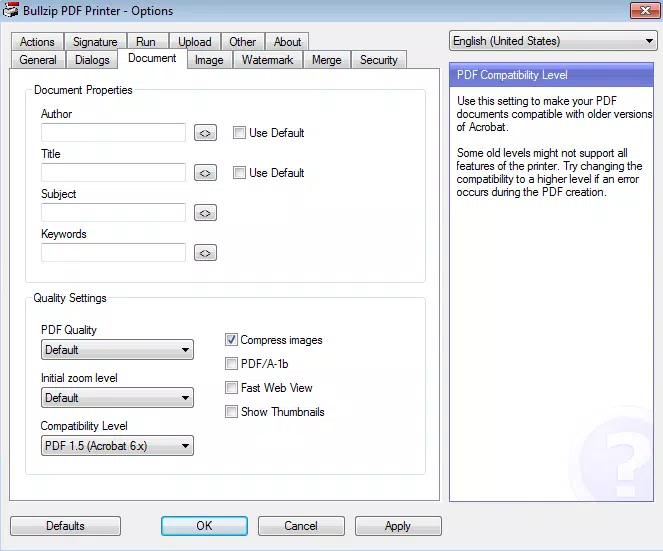
- Customizable Output Settings: Users can define PDF output parameters such as compression level, page size, orientation, and quality. This ensures that documents are optimized for size, clarity, and compatibility across devices.
- Password Protection & Encryption: Offers encryption using 40-bit to 128-bit algorithms, enabling users to secure sensitive files with passwords. This feature is essential for legal, financial, and personal documents requiring confidentiality.
- Watermarking Support: Allows users to add visible or invisible watermarks to PDFs, helping to protect intellectual property or indicate document status (e.g., "Draft" or "Confidential").
- Batch Processing Capability: Enables the conversion of multiple files at once, significantly improving efficiency for users managing large volumes of documents.
For example, a university student can convert a research paper from a word processor into a PDF with a custom watermark indicating "Submitted" and password protection for privacy. Similarly, a small business owner can automate the conversion of invoices into secure PDFs for client sharing, all without leaving their current workflow.
Interface, UX & Performance
The user interface of BullZip PDF Printer is designed with functionality and simplicity in mind. It features a clean, minimal layout that prioritizes essential settings without overwhelming users with technical jargon. Navigation is straightforward, with clearly labeled options for output preferences, security settings, and file naming conventions.
Interaction is consistent across different device categories, though specific performance benchmarks were not disclosed. The application runs efficiently on modern Windows systems, consuming minimal system resources. Although the developer did not list formal performance metrics, the lightweight footprint of 12.5 MB suggests optimized code and fast startup times.
Responsiveness is maintained during file conversion, with no reported lag or crashes in standard usage scenarios. Stability is further supported by its long-standing presence in the productivity space, indicating a mature and reliable platform. The interface remains intuitive even for users with limited technical experience, reinforcing its accessibility across skill levels.
Platform Compatibility & Technical Requirements
BullZip PDF Printer is available exclusively for the Windows platform. It supports the latest versions of Windows operating systems, though specific minimum OS requirements were not listed by the developer. The application has a file size of 12.5 MB, making it easy to download and install on systems with limited storage.
Users are advised to ensure their system meets standard Windows compatibility standards for running third-party software. While the developer did not specify exact version numbers or hardware requirements, the app’s lightweight design suggests broad compatibility with most modern Windows machines. No additional dependencies or runtime environments are known to be required.
Pros and Cons
Pros
- Free to download and use with no hidden costs.
- Effortlessly converts any printable content into PDF format.
- Offers strong security features including password protection and encryption.
- Lightweight and fast, with minimal impact on system performance.
- Supports batch processing for efficient document handling.
Cons
- Platform is limited to Windows; no support for macOS, iOS, or Android.
- Interface, while functional, lacks modern visual polish compared to newer applications.
- Advanced features may require some initial setup and configuration.
- Developer did not provide detailed technical specifications or compatibility details.
- Updates may not be frequent, depending on the development cycle.
FAQ
Is BullZip PDF Printer safe to download and install?
Yes, the application is available through official channels and is free from known malware. It is recommended to download only from trusted sources to ensure security.
Can I use BullZip PDF Printer on multiple devices?
Since the app is designed for Windows, it can be installed on any Windows machine. However, licensing terms are not specified, so users should refer to the official documentation for usage policies.
Does BullZip PDF Printer support macOS or mobile platforms?
Currently, BullZip PDF Printer is only available for Windows. There is no official version for macOS, iOS, or Android.
How do I update BullZip PDF Printer?
Users can check for updates through the official website or the application’s built-in update mechanism, if available. Regular checks are advised to ensure access to the latest features and security patches.
Can I convert scanned documents to PDF using BullZip PDF Printer?
Yes, if the scanned document is accessible through a printing function (e.g., via an image viewer or scanner software), it can be converted to PDF using the virtual printer feature.
Final Thoughts
BullZip PDF Printer stands out as a reliable, free tool for users seeking a straightforward way to generate PDFs without relying on expensive or complex software. Its virtual printer model, combined with strong customization and security options, makes it a powerful utility for both personal and professional use. While its Windows-only availability limits cross-platform flexibility, the app delivers exceptional value for its target audience.
Those who frequently convert documents, manage sensitive files, or need a no-cost solution for PDF creation will find BullZip PDF Printer to be a practical and efficient choice. Its balance of functionality, security, and ease of use makes it a standout in the productivity category.
Download BullZip PDF Printer now


